
【EN】ENERMAX Tuner Software User Manual
ENERMAX Tuner Software User Manual
ENERMAX Tuner Features
⚠Important Note:The following instructions describe the functions available in the software interface. The actual software interface design may vary slightly.
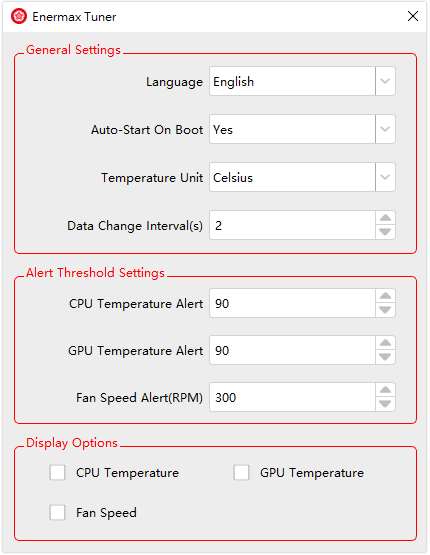
1. General Settings
- Language: Select your preferred language: English, Traditional Chinese, or Simplified Chinese.Please restart the software after changing the language.
- Auto-start: Enable or disable the automatic startup of ENERMAX Tuner when your computer powers on.
- Temperature Unit: Choose between Celsius and Fahrenheit.
- Display Data Rotation Time: If the water block screen displays multiple options, you can set the time interval (in seconds) for rotating between different data displays.
2. Alert Settings
- CPU Temperature Alert: Input a temperature value. When the CPU temperature exceeds this value, the water block screen will flash white.
- GPU Temperature Alert: Input a temperature value. When the GPU temperature exceeds this value, the water block screen will flash white.
- Fan Speed Alert: Input a fan speed value.When the fan speed drops below this value, the water block screen will flash white.
3. Screen Display Options
- Select the data to be displayed on the water block screen.